
Cric Counter Support
Everything you need to get counting — and how to reach us if something isn’t right.
How to use Cric Counter
Cric Counter is a simple cricket umpire counter for tracking overs, wickets and extras during a match.
Recording deliveries
| Button | What it does | Legal ball? |
|---|---|---|
| Ball | Records a legal delivery | Yes |
| Wicket | Records a wicket (also counts as a legal ball) | Yes |
| Wide | Records a wide delivery | No |
| No-ball | Records a no-ball delivery | No |
| Byes | Records byes (ball passed the batter) | Yes |
| Leg B | Records leg byes (ball hit the batter’s body) | Yes |
Other controls
- Undo — removes the last recorded delivery.
- Reset — clears all data and starts fresh (asks you to confirm first).
Understanding the display
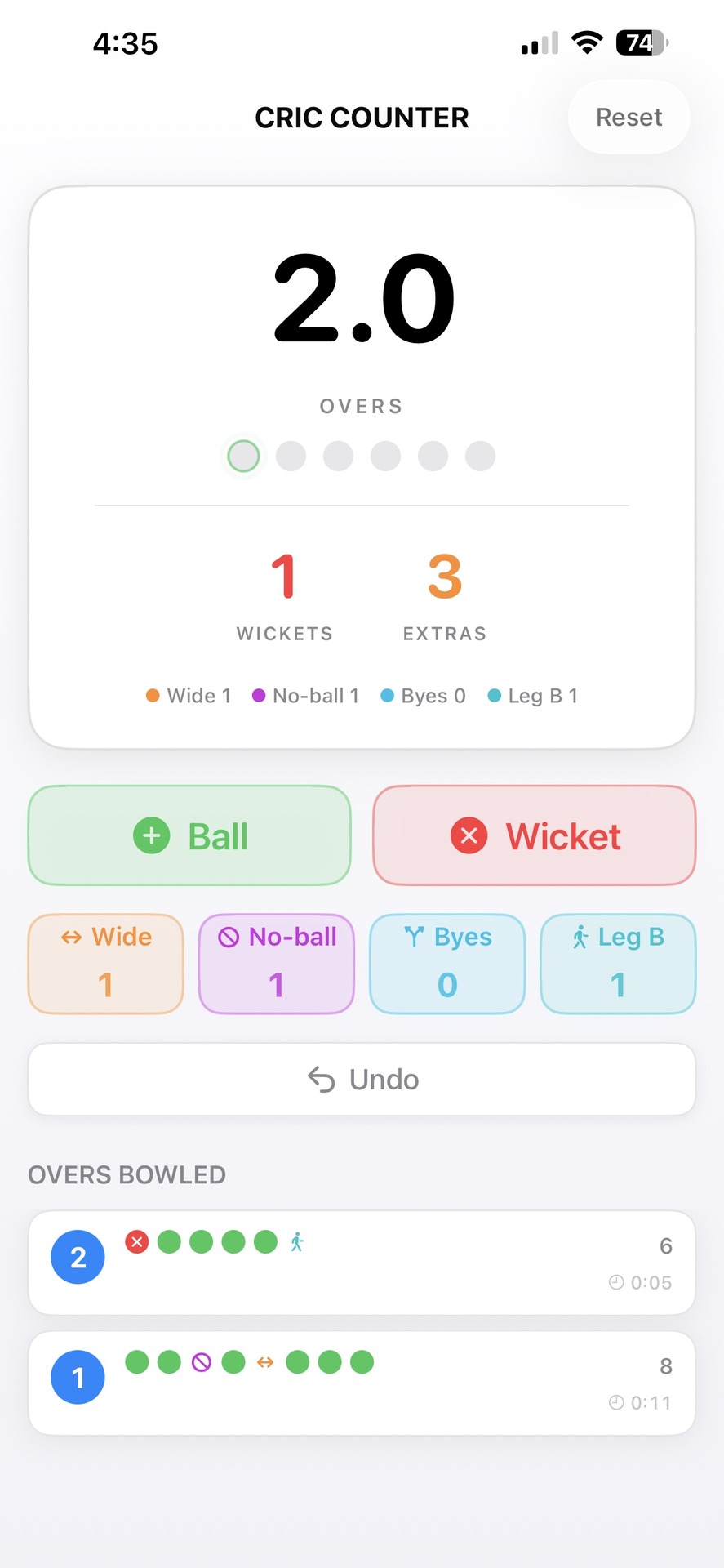
Score card
- Large number — completed overs and balls (e.g. 12.4 = 12 overs and 4 balls).
- Ball indicators — six circles showing progress through the current over.
- Pulsing ring — where the next delivery will be recorded.
- Wickets — total wickets fallen.
- Extras — total extras with a breakdown by type.
Overs bowled
- Every completed over, most recent at the top.
- Coloured icons show the sequence of deliveries.
- Each over shows the number of deliveries and how long it took.
Tips
- The app saves automatically — your data persists even if you close the app.
- Use Undo for mistakes — tapped the wrong button? Just tap Undo.
- Over duration is automatic — the timer starts with the first delivery and stops at the 6th legal ball.
- All-out detection — the app detects when 10 wickets have fallen.
Frequently asked questions
General
Do I need an internet connection?
No, Cric Counter works completely offline.
Is my data backed up?
Data is stored locally on your device. It is not automatically backed up to the cloud. If you uninstall the app, your data will be lost.
Does the app collect any personal information?
No, Cric Counter does not collect any data whatsoever. See our Privacy Policy for details.
Scoring
Why don’t wides and no-balls count towards the over?
Under the Laws of Cricket, wides and no-balls are not legal deliveries and must be re-bowled. They don’t count as one of the six balls in an over.
What’s the difference between Byes and Leg Byes?
Byes: the ball passes the batter without touching bat or body.
Leg byes: the ball hits the batter’s body (not the bat) and runs are scored.
Both count as legal deliveries but are recorded as extras.
Can I track multiple innings?
Currently, Cric Counter tracks one innings at a time. Use the Reset button to start a new innings.
What happens at 10 wickets?
The Ball and Wicket buttons become disabled to indicate the innings is complete. You can still add extras if needed.
Technical
The app isn’t saving my data. What should I do?
Make sure you have sufficient storage space on your device. Try closing and reopening the app.
Which devices does Cric Counter support?
Cric Counter is available for iPhone only (iOS 17.0 or later).
What iOS version do I need?
Cric Counter requires iOS 17.0 or later.
Troubleshooting
App not responding
- Force close the app.
- Reopen the app.
- Your data should still be saved.
Data lost after an update
Unfortunately, lost data can’t be recovered. For important matches, we recommend noting key statistics elsewhere as well.
Buttons not working
Check whether the innings is all out (10 wickets). The Ball and Wicket buttons are disabled once all out.
Contact support
Having issues or suggestions? Email jaskarans64@gmail.com. Please include:
- Your device model (e.g. iPhone 15)
- Your iOS version (e.g. iOS 17.4)
- A description of the issue
- Steps to reproduce it, if you can
Feature requests
Got an idea to make Cric Counter better? Send it to jaskarans64@gmail.com. We read all feedback and consider it for future updates.
About
| Version | 1.0 |
| Developer | SymbioticNow Ltd |
| Contact | Jas Singh |
| Requires | iPhone with iOS 17.0 or later |
| jaskarans64@gmail.com |
Cric Counter was designed with love for the game of cricket — a simple, reliable tool for umpires and scorers at every level.